
Answer
Questions in plain words
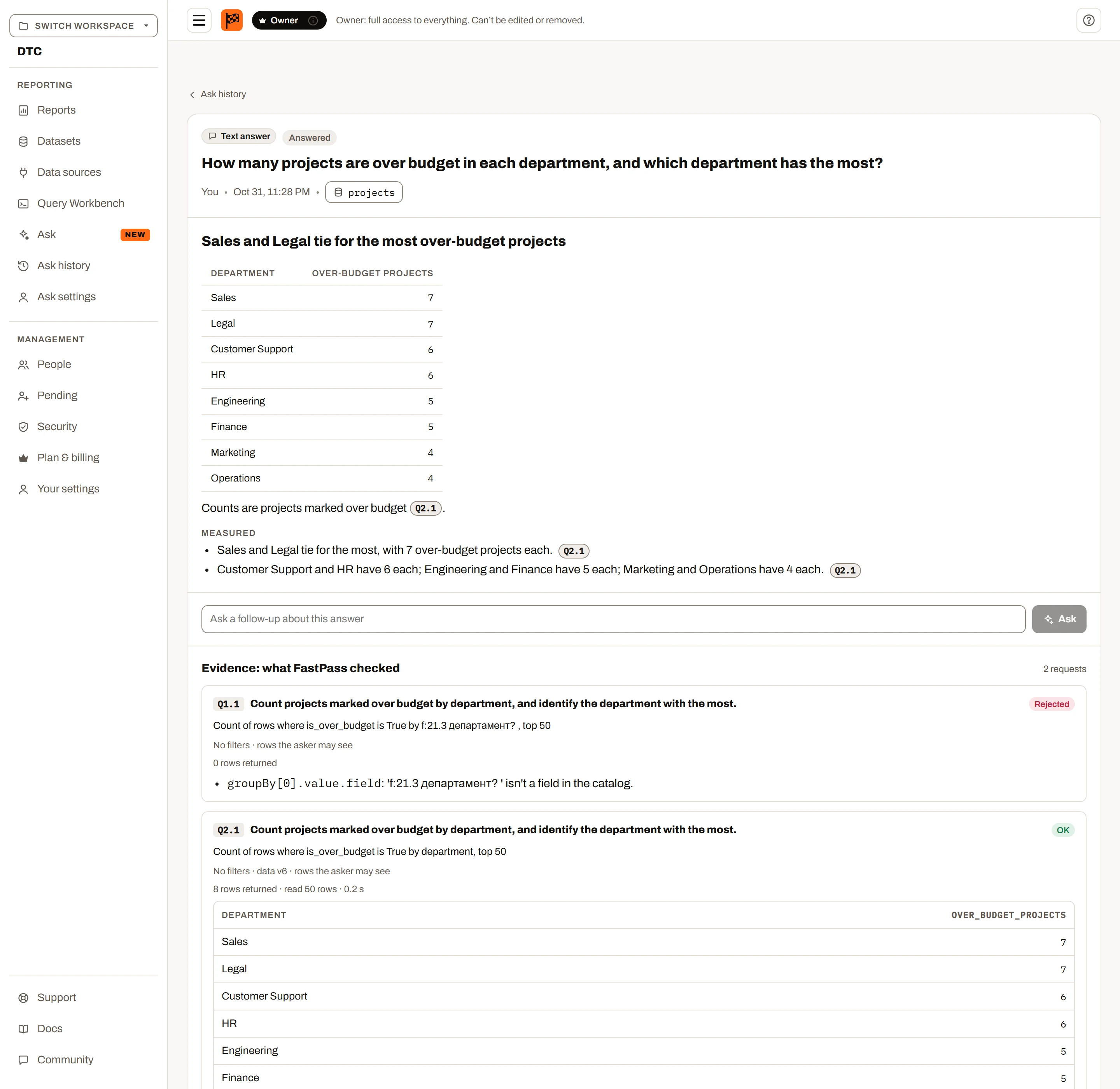
“Which regions missed their Q3 target, and by how much?” The answer comes with the figures behind it.
BetaFree accounts and the desktop app are available now. Paid plans, with reports on the web, sharing and live connections, launch once enough people ask for them. Express your interest
Ask FastPass Ultimate
Coming soon Ask FastPass comes with the full release. Every visual, template and calculation is in the desktop app now. The full release launches once enough people ask for it. Express your interest
Pick the datasets, type a question in plain words, and Ask FastPass works out which totals, breakdowns and comparisons it needs, runs them on the rows you are allowed to see, and writes an answer that shows its evidence.
Part of Ultimate: 100 questions per billing period for the workspace, viewers included.
What it does
Answer
“Which regions missed their Q3 target, and by how much?” The answer comes with the figures behind it.
Explain
On a saved report, it explains what the page shows, which filters apply and how current the data is — useful for whoever reads the report next.
Check
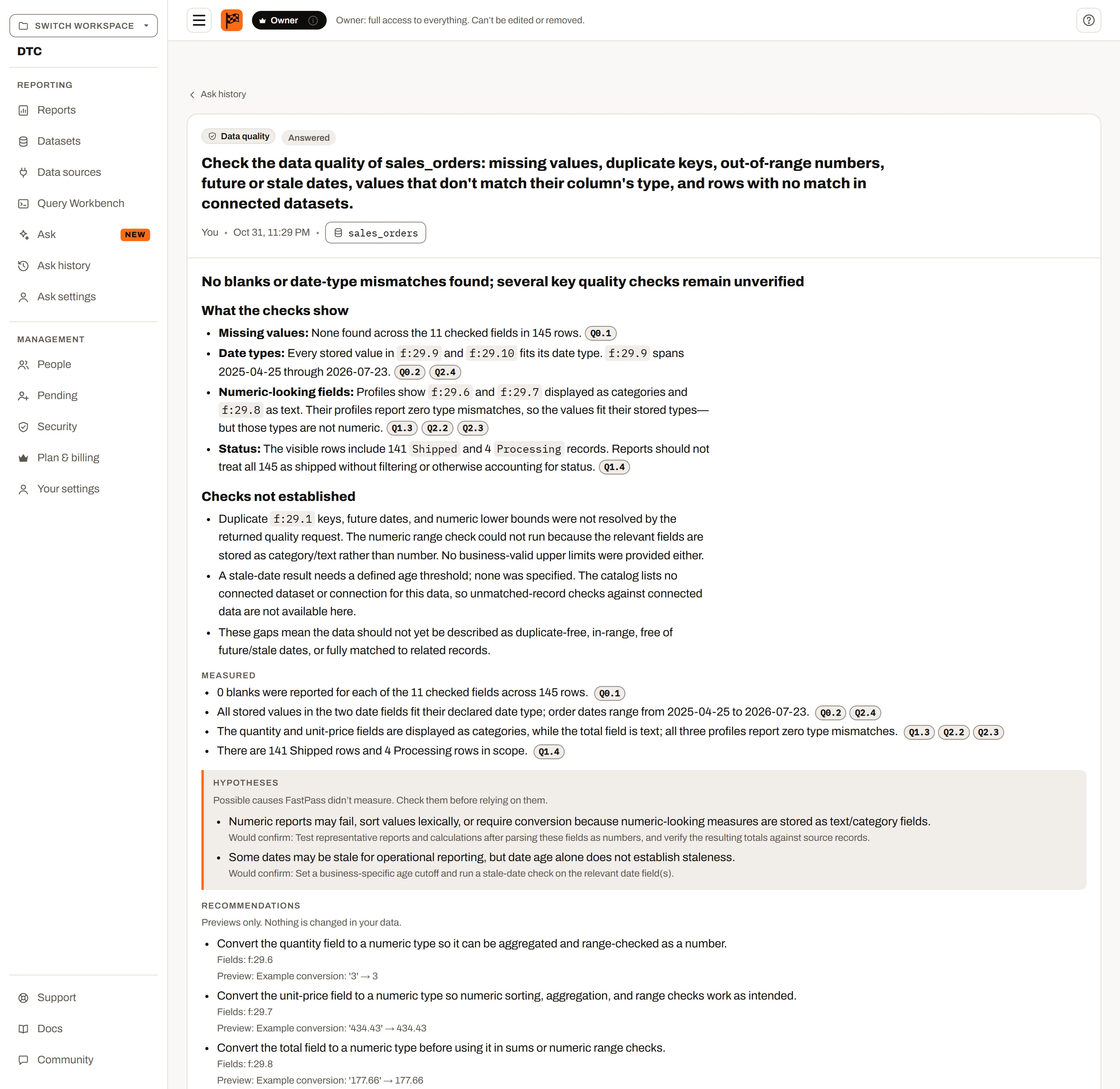
Missing values, duplicate keys, numbers out of range, stale dates and rows with no match in a linked dataset, with what it found and what it recommends.
Build
Ask for a report and your browser builds it from your data, with your access, ending in a short summary of what the charts show.
Calculate
Ask for a margin, a running total or a days-late column and it comes back as a Summary Calculation or calculated field, checked against your data before you add it. The Data pane can suggest them too.
Query
Describe the rows you want and it writes the FPQL, ready to run in the Query Workbench, for the people who can use it.
Evidence, not just an answer
Every answer lists the requests Ask FastPass made and the results it was given. If a number looks wrong, you can see where it came from — and Ask history keeps the whole exchange for later.
What is sent, and what is kept
An owner or admin turns Ask FastPass on for the workspace after reading what it sends and keeps. Answers are written by OpenAI from what is listed below.
Included with Ultimate
Ask FastPass is part of Ultimate, with 100 questions per billing period for the workspace. Anyone in the workspace can use it once it is on, viewers included.
No. It sees a description of the datasets you pick and the results of the requests it makes, limited to the rows you are allowed to see. Whole datasets, personal-data columns and columns you untick are never sent.
OpenAI writes the answers from what Insight FastPass sends it. The notice an owner or admin reads before turning it on says exactly what that is.
Each workspace gets 100 questions per billing period, and the count resets on the billing date.
Yes, in the desktop app on Ultimate. The questions run on your computer against the report’s own data, and only the results are sent to be written up.
Check them: every answer shows the requests behind it and the figures it was given. Answers can be wrong or incomplete, and the evidence is there so you can tell.
Try Insight FastPass free with your own spreadsheet. Ask FastPass is part of Ultimate, and answers from datasets refreshed from your databases as readily as from files.